Atlassian Forge Jira Cloud app

Resource Management for Jira

Match demand to real capacity — right inside Jira. Combine Jira work items, staffing plans and financial constraints into a single view. Validate trade-offs before you commit — and see who is over capacity before it costs you a deadline.
Demand
vs supply, in one view
Worklogs
Actuals, automatically
Forge
Runs inside Jira
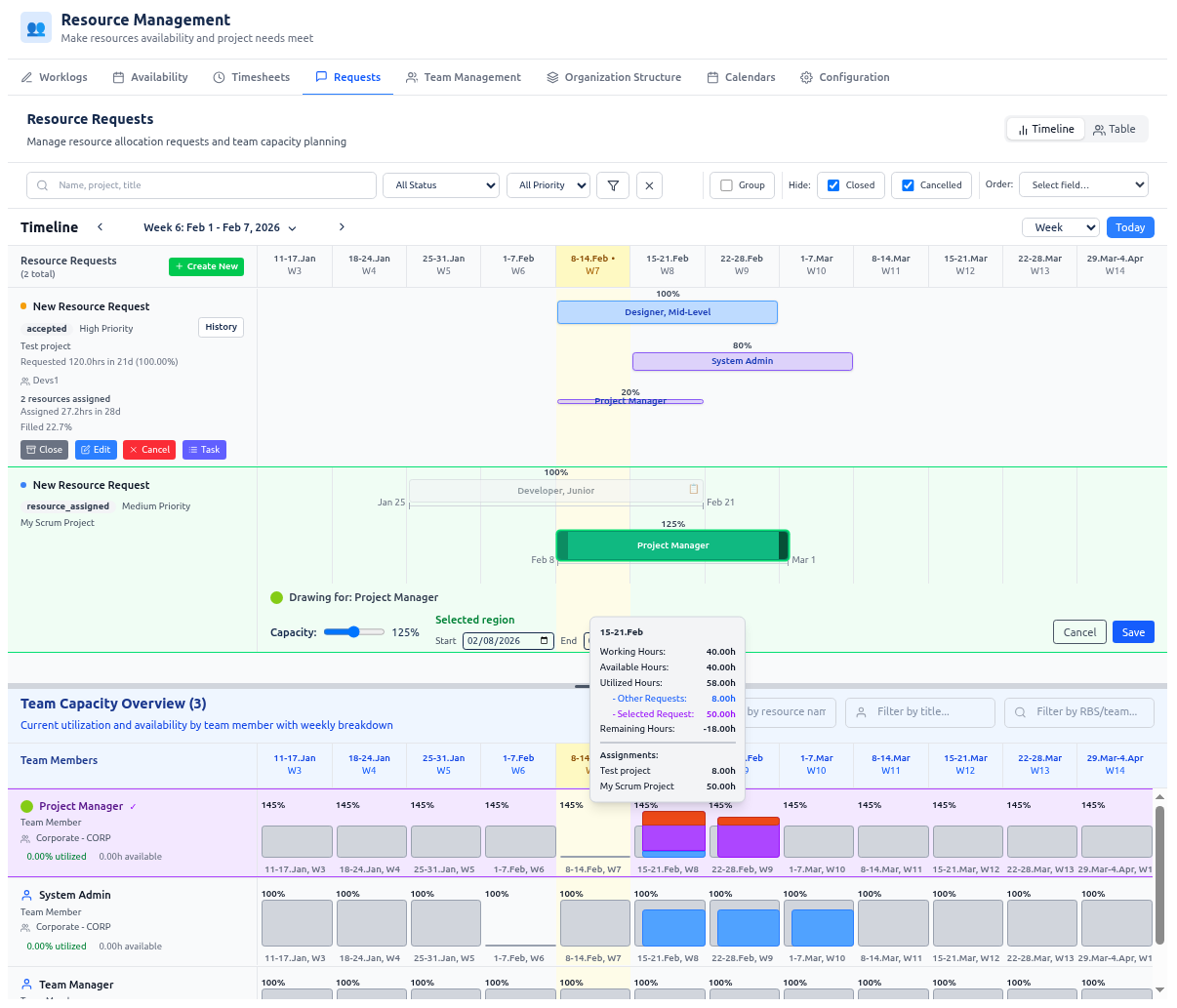
Resource Management for Jira · Resource Requests
Resource Requests timeline with team capacity overview inside Jira
Over capacity
Project Manager · 125%
Built on the Atlassian platform
Atlassian MarketplaceRuns on ForgeJira CloudMS Project round-trip
PRODUCT

Transform resource planning from guesswork into precision.

A single solution that combines enterprise-grade org structure, calendar-based capacity, structured resource requests, Jira worklogs, advanced analytics, and invoice-ready exports — all in your familiar Jira or Jira Service Management interface.

Enterprise-grade organizational structure management with automated external sync (teams/RBS, scoped managers)
Precise calendar-based capacity planning — plus self-service availability requests with Team Manager approval
High-density coordination between resource teams and projects through a structured request workflow and compact visual layouts — including one-click Jira task creation
Time reporting and timesheets powered by Jira worklogs — with reliable sync, optional submission/approval, and overtime tracking
Advanced analytics comparing demand, assigned allocations, capacity, and actuals across past and future periods
Vacation and time-off self-service that keeps calendars, capacity, and approvals aligned without email back-and-forth
Executive-level reporting and invoice-ready exports (CSV/XLSX) for billing, PMO visibility, and T&M analysis
Enterprise data integration via REST API — seamlessly synchronize your org structure, rates, and calendars from Azure AD, Outlook, or your HRMS

Your data is safe: the application stores your data in the fortified Atlassian Forge cloud, and only you (and Atlassian) can access it.
THE BIGGER PICTURE

How this fits in the context of project portfolio management.

Most companies don’t run one project in isolation. They run many projects in parallel, competing for the time of the same expert teams — engineering, QA, design, operations, and more. The bigger the company, the harder it becomes to coordinate this as one organization.

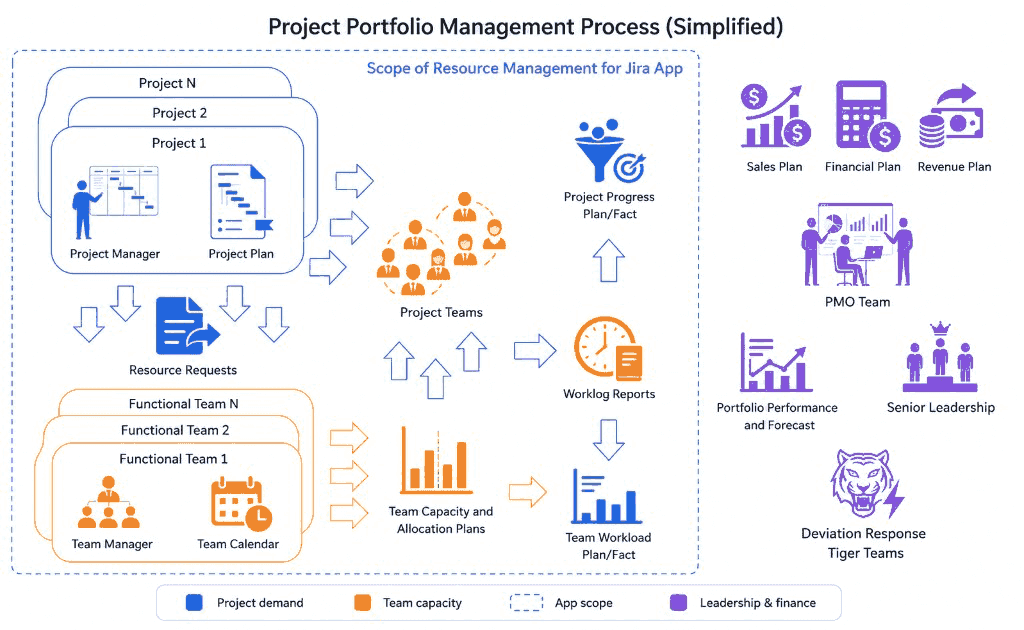
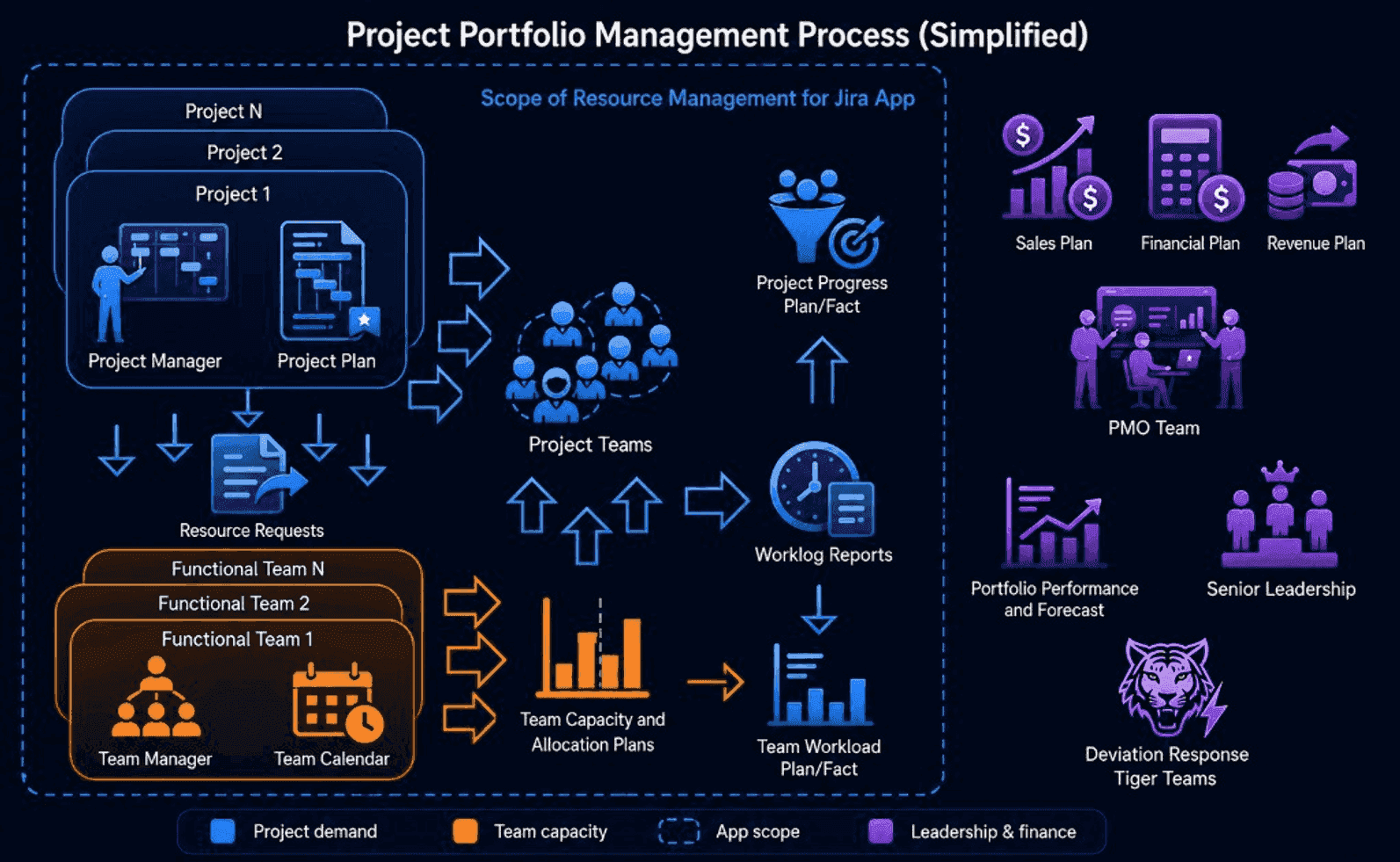
Projects and functional teams continuously exchange demand, capacity, and delivery signals — and these signals roll up into portfolio plans and reporting. The map below shows where Resource Management for Jira sits in that flow.

Project portfolio management process showing the scope of Resource Management for Jira Project portfolio management process showing the scope of Resource Management for Jira

Why this is difficult at scale

  • Portfolio planning is cross-functional: individual project plans roll up into portfolio-level plans where Sales, Finance, PMO, and senior leadership all need consistent data.
  • Projects and teams form a many-to-many system: each project needs multiple specialist teams, and each team serves multiple projects.
  • Many tools optimize a single team but leave the coordination layer (project ↔ teams) as manual work — spreadsheets, meetings, and ad-hoc negotiation.

What this product changes

  • Plan and staff cross-team delivery with a structured, stateful resource request workflow connecting PMs and Team Managers.
  • Track plan vs actual with 1-minute precision: baselines from approved allocations and effective calendars; actuals from Jira worklogs.
  • Handle deviations and exceptions: see overloads early, adjust allocations, and keep an audit-friendly trail of decisions.

Who benefits (beyond PMs and Team Managers)

  • PMO / portfolio stakeholders: clearer rollups across many projects and teams, and earlier visibility into capacity risks.
  • HR / resource governance: enterprise-grade hierarchical org structure (teams/RBS) and scoped manager access.
  • Finance / client invoicing: reliable time reporting sourced from Jira worklogs, ready for downstream billing.
  • Team members: a fast, modern time-reporting flow for creating and editing Jira worklogs.

Seamless Enterprise connectivity

The app runs natively inside Jira, using Jira objects as the operational source of truth while providing vast integration capabilities via REST API. Seamlessly synchronize your org structure, rates, and calendars from Azure AD, Microsoft Entra ID, Outlook, or your HRMS—eliminating duplicate org charts and ensuring your Jira environment reflects corporate reality without manual maintenance.

RESOURCE REQUESTS

Stateful resource request engine that connects PMs and teams.

A complete request lifecycle, powered by a state-machine workflow, connects Project Managers and Team Managers. Plan requests interactively on a high-density compact timeline, allocate partially (percent allocations), and get automatic summaries (requested vs allocated hours, fulfillment %). Resource load is computed continuously and overloads are flagged in real time.
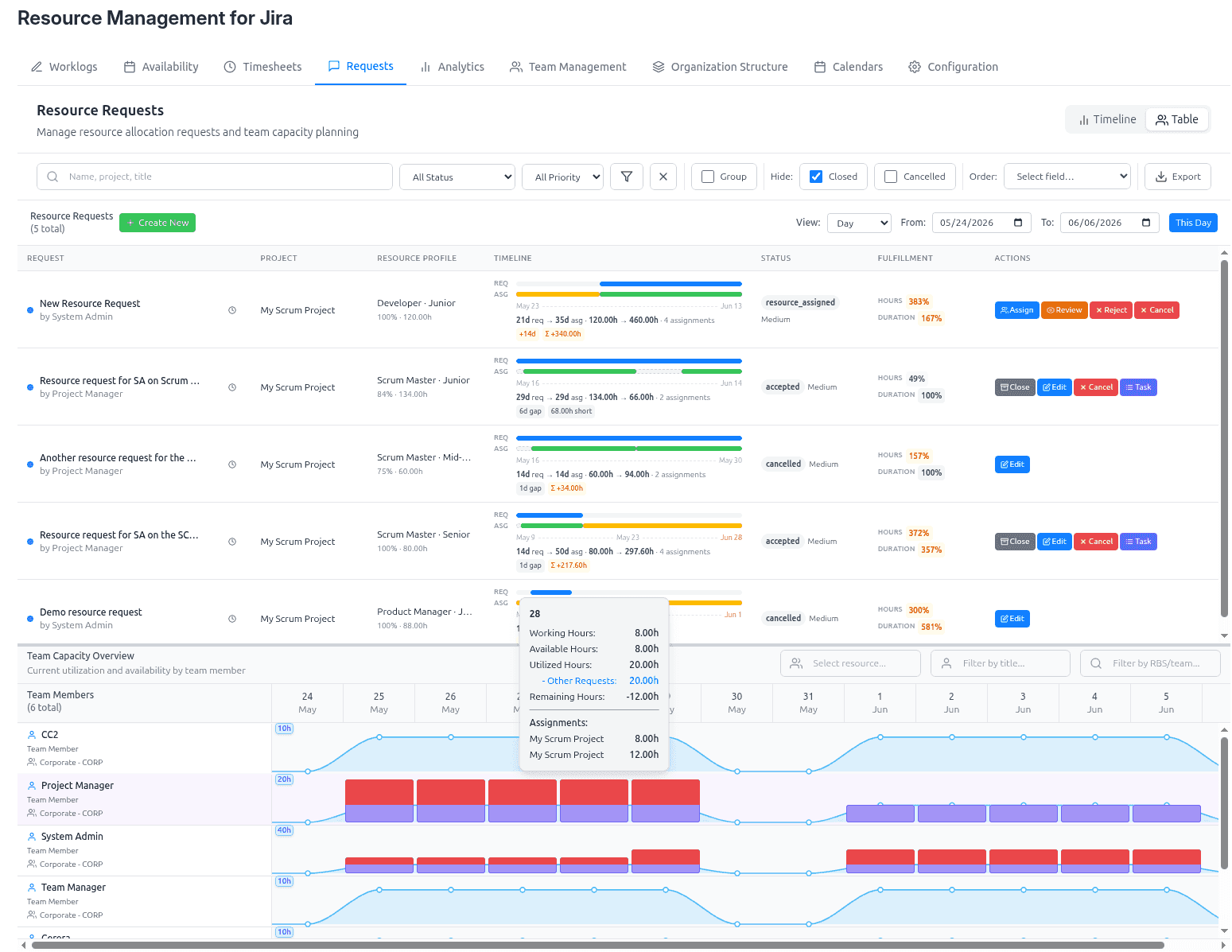
Better planning decisions through visual context
Structured handoff from project demand → team capacity → resource allocation
Full visibility into each resource’s effective and remaining capacity for Team Managers
Clear visibility into fulfillment status and gaps for Project Managers
One-click Jira task creation for accepted requests (assignee + watchers kept in sync)
Optional Jira notifications for key resource-request events (submitted, accepted, review, rejected, closed, cancelled)
Resource Requests · Timeline
Resource request timeline with team capacity overview and over-allocation detection
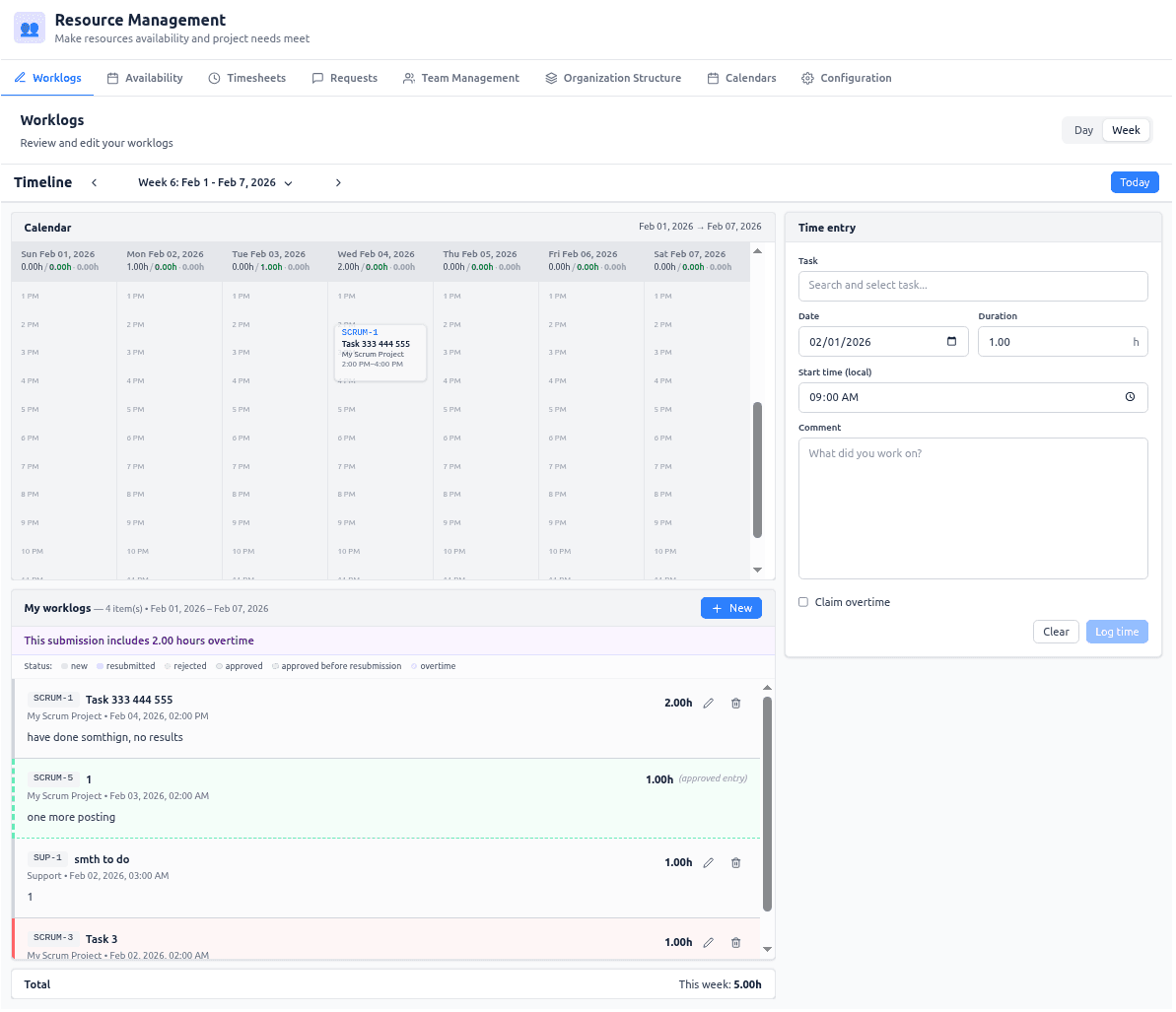
Worklogs · Day / Week calendar
Interactive Jira worklog calendar with day and week views
WORKLOGS

Rich Jira worklog management.

Jira worklog editing becomes a first-class workflow: day/week calendar views, smart start-time presetting, inline issue search, and fast update/create modes. When approvals are enabled, the same flow supports submission / resubmission and Project Manager approval or rejection — with separate overtime tracking. A reliable sync engine maintains a fast local mirror for timesheet aggregation, with user self-service “sync now” when needed.

Faster time entry with fewer errors
Interactive editing of Jira worklogs in a calendar view
Real-time visibility into total hours logged for the selected period
Optional Jira notifications for overtime claims and approval decisions
TIMESHEETS

Intelligent timesheets with baseline comparison.

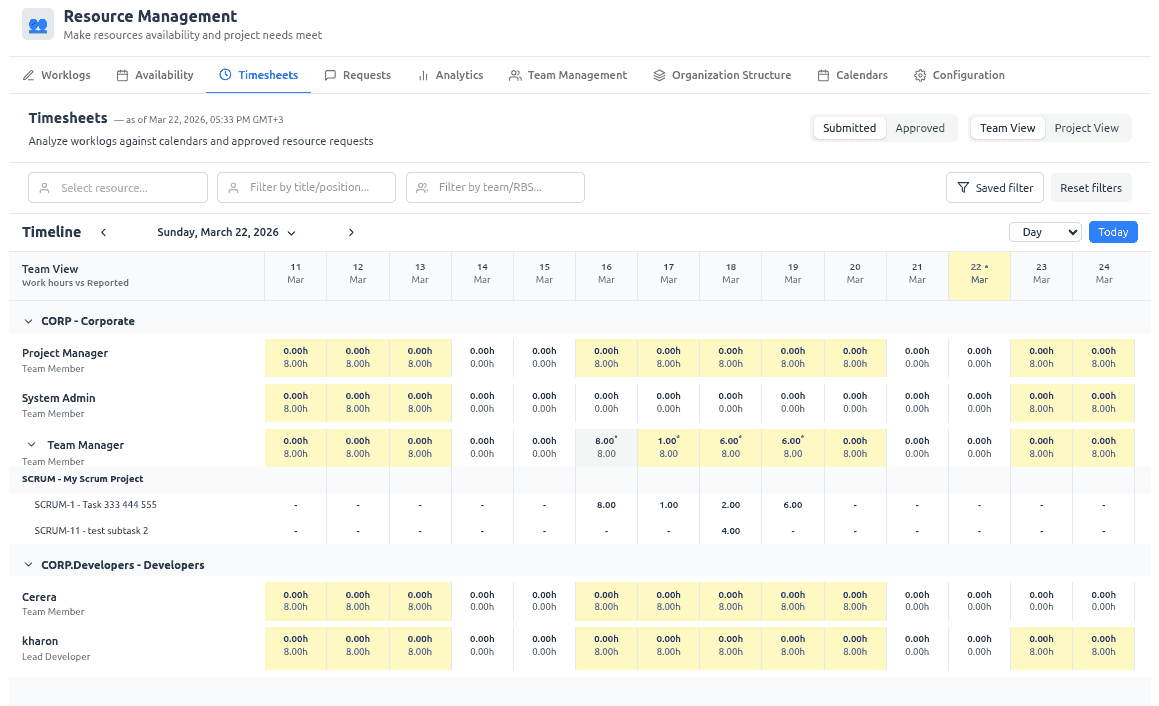
Timesheets become actionable by comparing actuals against smart baselines:

Team View: posted hours vs available working time from effective calendars
Project View: posted hours vs allocated hours from approved resource requests

Color-coded variance highlights discrepancies so you can spot utilization risks and under- or over-reporting at a glance.
Immediate detection of over-allocation and under-utilization
Better compliance and audit readiness
Download invoice exports (CSV/XLSX) for a selected project and date range
Timesheets · Team View
Timesheets comparing logged hours against available capacity and approved allocations
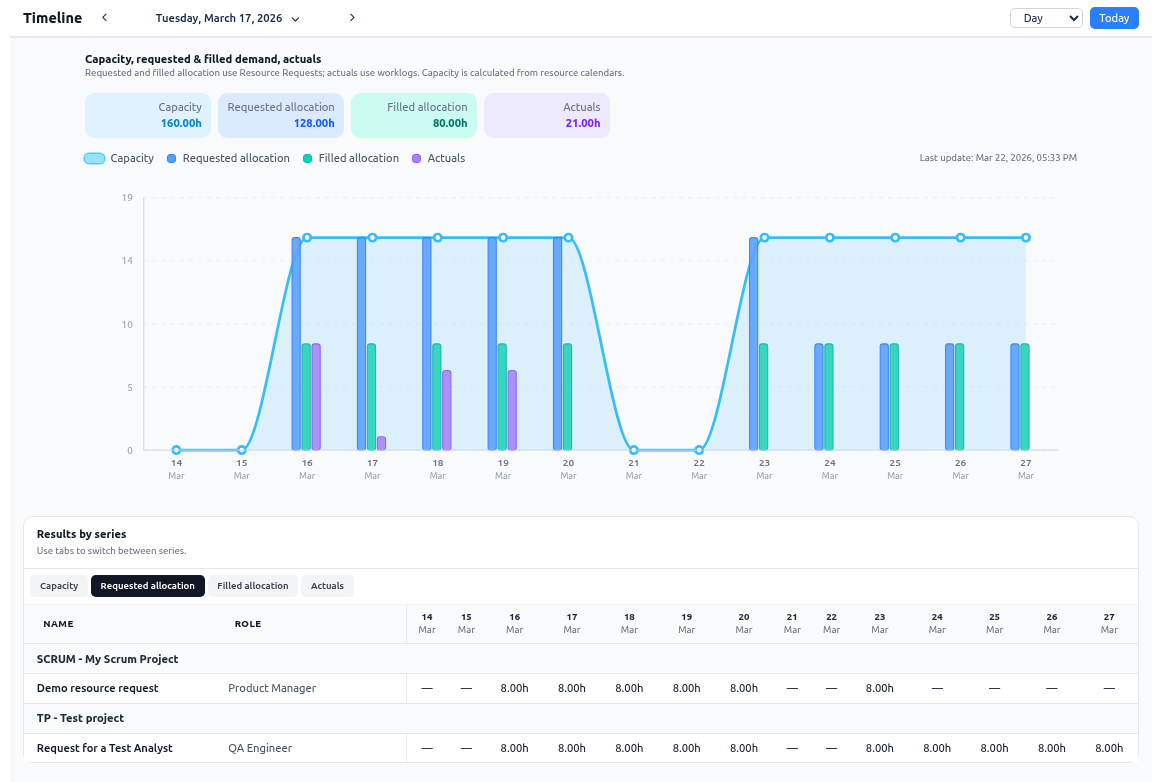
Analytics · Capacity vs Demand vs Actuals
Analytics comparing capacity, demand, filled allocation, and actuals on one timeline
ANALYTICS

Advanced resource analytics for smarter portfolio decisions.

Planning data becomes much more valuable when you can see it as a decision-making system, not as isolated screens. The Analytics module gives PMOs, Teams, and Projects a forward-looking view of how project demand, assigned allocations, available capacity, and actual logged work evolve across the same timeline.

With one analytics workspace, you can compare:

Capacity 160h Requested 128h Filled 80h Actuals 21h
Turn fragmented staffing signals into one clear demand-versus-capacity view
Spot overcommitment, underutilization, and fulfillment gaps before they turn into schedule risk
Strengthen delivery predictability with plan-versus-actual visibility in Jira-native workflows
BILLING

Invoice-ready exports for faster, cleaner billing.

For T&M delivery and executive governance, reporting quality depends on trustworthy source data and a fast path from recorded work to both invoice preparation and PMO analysis — using the same Jira worklogs and project filters your teams already rely on.

Turn approved or submitted time into billing-ready files without manual spreadsheet consolidation
Reduce disputes by grounding invoices in transparent, traceable worklog data
Speed up month-end and project billing cycles
Keep finance, delivery, and project teams aligned on the same numbers

Executive & Billing exports (CSV/XLSX) for one selected project and date range — with a dedicated structure for request fulfillment, assignment details, and effective rates for billing.
From worklog to invoice
Time & materials
STEP 1
Jira worklogs
Single source of truth — logged in Jira or the Worklogs tab, synced for reporting.
STEP 2
Timesheets & approval
Compare actuals to capacity or allocations; optional submit/approve workflow and overtime tracking.
STEP 3
Invoice export
Download CSV/XLSX for the selected project, period, and hour basis — ready for finance.
CSV XLSX Effective rates Submitted / approved Overtime
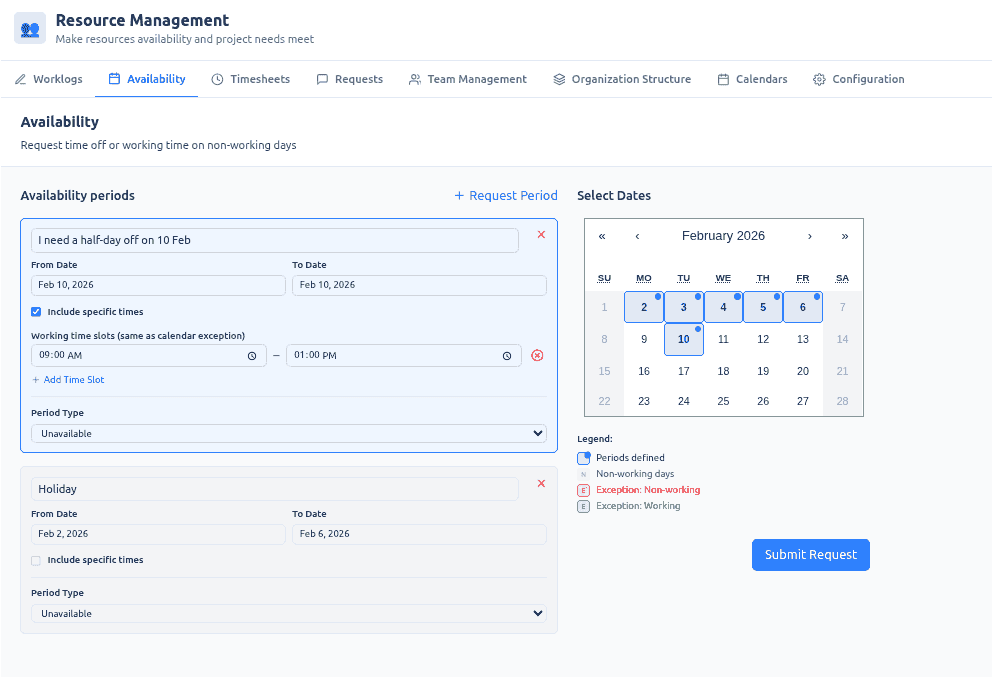
Availability · Self-service
Self-service vacation and time-off requests with manager approval workflow
AVAILABILITY

Vacation and time-off self-service that keeps plans realistic.

Capacity plans fail when availability changes stay trapped in emails, chats, or spreadsheets. Employees get a self-service way to request vacation, time off, partial-day exceptions, and even working time on non-working days, while managers approve or reject those requests in a controlled workflow.

More reliable capacity calculations for upcoming periods
Fewer surprises caused by unrecorded leave or schedule exceptions
Cleaner plan-versus-actual analysis in requests, timesheets, and analytics
CALENDARS

Accurate capacity planning with multi-calendar intelligence.

Traditional tools assume uniform working hours and ignore real-world calendars (part-time schedules, holidays, sabbaticals, role changes). Our multi-calendar engine calculates true capacity using effective periods, exceptions, and availability windows, for various locations — so plans stay realistic.
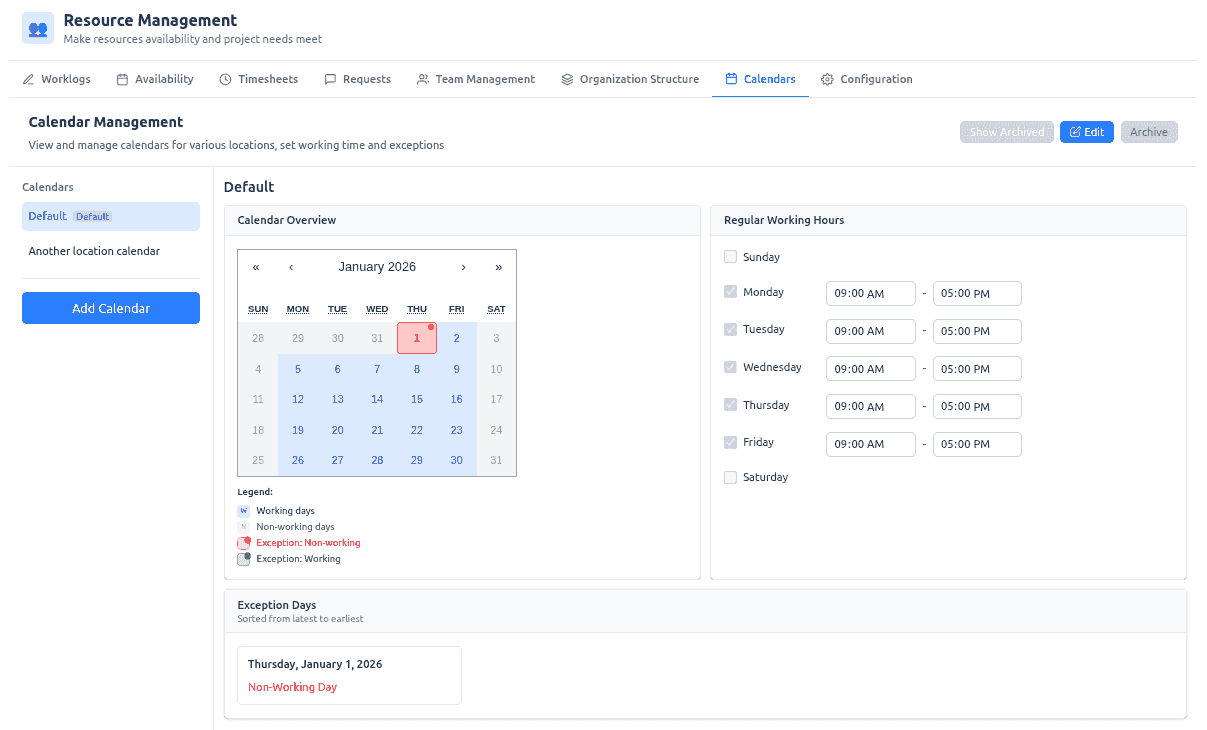
Fewer scheduling conflicts caused by bad capacity assumptions
Accurate baselines for utilization and timesheets
Better forecasting across day/week/month/quarter
Calendars · Working hours & exceptions
Multi-calendar management with working hours, holidays, and exception days
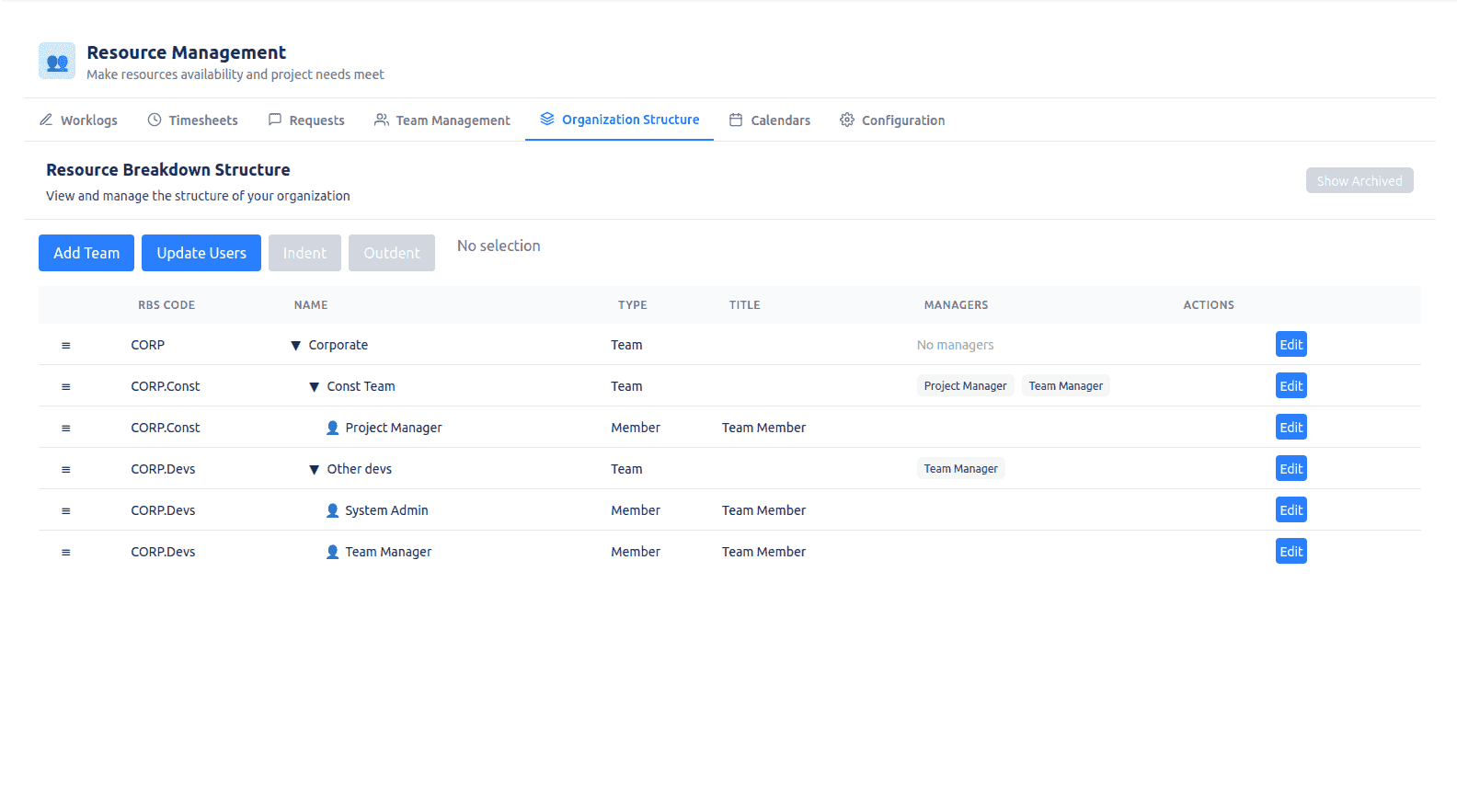
Organization Structure · RBS
Enterprise resource breakdown structure with teams, RBS codes, and scoped managers
ORG STRUCTURE

Enterprise organizational structure (teams, RBS, scoped managers).

Scale resource management across large organizations with a hierarchical team structure (RBS codes) and scoped Team Manager access. Managers see and control only their teams, while maintaining a clean separation between system users and assignable resources.

Clear accountability and delegation at scale
Fast reporting and filtering via RBS structure
Reorganization is as simple as drag-and-drop
ENTERPRISE INTEGRATION

User Directory sync with Azure AD and external IAM.

Large organizations maintain team hierarchy in Active Directory, Microsoft Entra ID, or HR/IAM — not in Jira. Resource Management closes that gap with secured inbound directory sync.

No duplicate org charts
PMO and HR define teams once in AD; Jira reflects reality without manual maintenance at scale.
Full snapshot semantics
Each payload can replace the intended tree, archive retired teams, and refresh manager scopes.
Validate before apply
Dry-run preview in Configuration or CI prevents a bad export from reshaping production structure.
Read-only Structure tab
When enabled, manual edits cannot fight the corporate directory source of truth.

Inbound-only sync. Directory export, email→Jira account resolution, and scheduling live outside the app — the Forge app validates, applies, and audits without calling AD outbound.

Directory sync flow
Azure AD · Entra ID · IAM
SOURCE
Corporate directory
Teams, managers, and group membership from Azure AD, Entra ID, or your IAM/HR export.
EXPORT
Scheduled job or CI pipeline
Your scripts export the org snapshot and push it to the app on a cadence you control.
APPLY
Org structure in Jira
Validate, apply, and audit team hierarchy, RBS paths, managers, and member assignments inside Resource Management.
Validate mode Apply mode Audit trail Read-only structure
TEAM MANAGEMENT

Team Manager control center: calendars, availability, and effective rates.

In the Team Management view, Team Managers work only with members of their managed teams and can maintain the inputs that drive capacity, timesheets baselines, and invoicing:
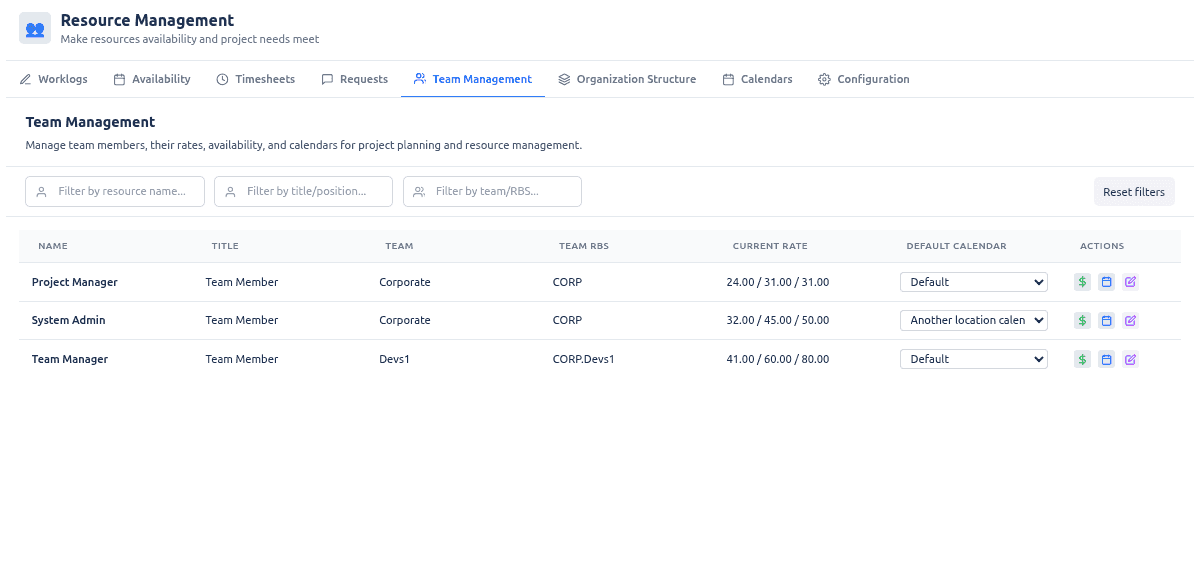
Default working calendars per person (working pattern + holidays)
Calendar overrides for specific date ranges (business trips, temporary schedule changes)
Effective rate periods (standard / overtime / weekend) for cost calculations and invoice exports
Team Management · Rates & calendars
Team Manager view for rates, calendars, and availability per team member
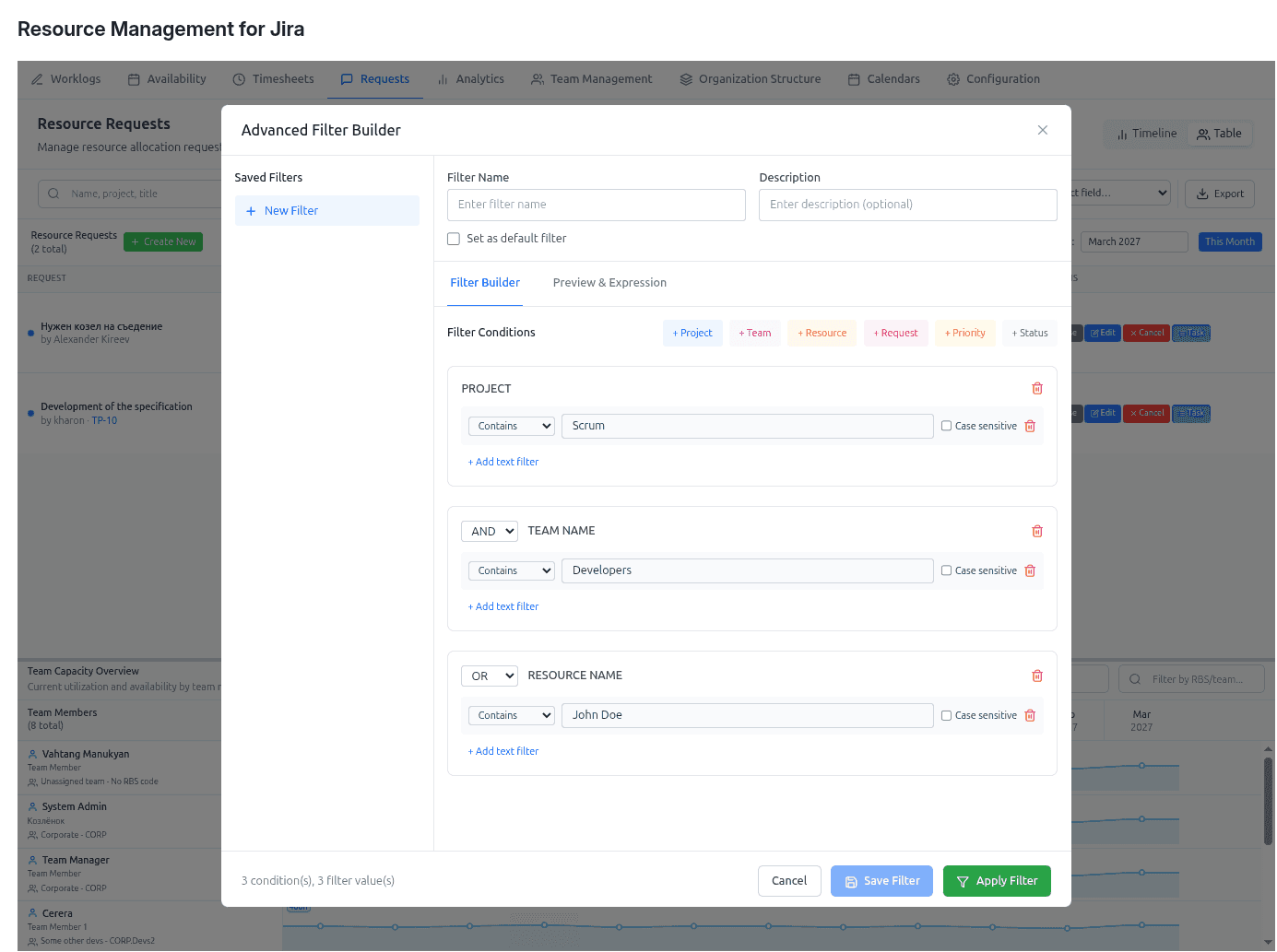
Advanced Filter Builder
Advanced filter builder with AND/OR logic and saved filters for large portfolios
FILTERING & SEARCH

Advanced filtering & search for large portfolios.

Navigate confidently across large datasets with a powerful filter builder that supports AND/OR logic, pattern matching (contains/starts/ends/exact/regex), saved filters, and real-time search across teams, projects, resources, and requests.

Find what you need in seconds (even with thousands of requests)
Reusable saved filters for reporting and operations
Faster day-to-day portfolio triage
ACCESS CONTROL

Granular, scoped access control for real enterprises.

A role model built for scale: Instance Admin, Resource Management for Jira App Admin, Team Manager (scoped), Project Manager (scoped), and Viewer. Multi-role users can switch perspectives, and backend-enforced scopes ensure the right people see the right data.

Secure by design, with scoped visibility
Supports delegation without chaos
Context-aware actions by role and request
Your data is safe.
The application stores your data in the fortified Atlassian Forge cloud, and only you (and Atlassian) can access it.
See our security
READY TO SEE IT IN ACTION?

Stop the planning lie.

Resource governance for Jira — demand, capacity and actuals in one view, running on Atlassian Forge.

FAQ

Frequently asked questions

What is Resource Management for Jira?
Resource Management for Jira is a Forge app for Jira Cloud that matches project demand to real team capacity. It combines organizational structure, calendar-based capacity planning, a cross-team resource request workflow, worklogs, timesheets, and analytics — all inside your familiar Jira interface.
How is it different from native Jira capacity tracking?
Native Jira assumes flat, theoretical availability. Resource Management calculates true effective capacity from real calendars, exceptions, and approved availability, then lets you compare demand, allocations, and actuals across teams and projects — so plans stay realistic instead of looking balanced on paper.
Does it support cross-team resource requests?
Yes. Project Managers raise structured resource requests; Team Managers respond with feasible assignments. The workflow makes status and ownership explicit, supports partial allocations, and can create Jira tasks in one click for accepted requests.
Can it generate timesheets and invoices?
Yes. Jira worklogs feed timesheets that compare logged time against the right baseline (available capacity or allocated time), support optional approval workflows, and export invoice-ready CSV/XLSX for time-and-material billing based on submitted or approved hours.
Where is my data stored and is it secure?
Resource Management is built on Atlassian Forge, so your resource and time data stays inside the Atlassian cloud — only you and Atlassian can access it — inheriting Atlassian's data residency and security model.
