MS Project Round-Trip Planning
One of the most powerful capabilities of MSP Planner is its ability to let you "live in two worlds." You can leverage the collaborative power of Jira for your team's daily execution, while maintaining the professional reporting standards of Microsoft Project for your stakeholders.
This is achieved through Lossless Round-Trip Interoperability.
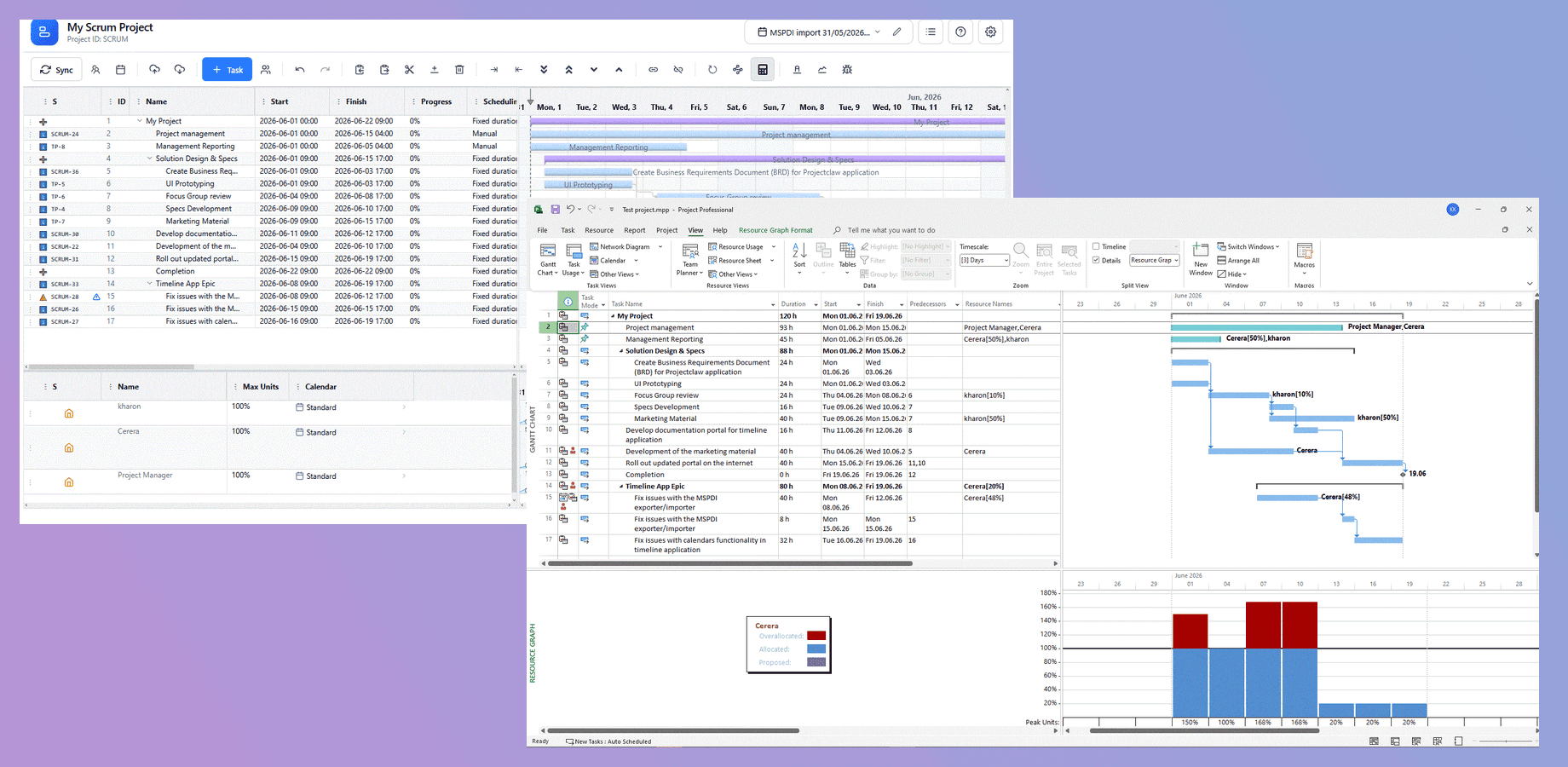
The Round-Trip Workflow
Unlike simple file converters that only move dates, MSP Planner maintains a persistent link between your schedule and the underlying Jira issues using the MSPDI XML standard.
Step 1: Export for Review
When you need to share your plan with a PMO or a client who uses Microsoft Project:
- Use the Export control in the toolbar.
- The app generates a MSPDI XML file containing embedded metadata that preserves the project structure, dependencies, and resource assignments.
- Send this file to your stakeholders for review and modification.
Step 2: External Modification
Your stakeholders can open the file in Microsoft Project, adjust dates, add new milestones, or reallocate resources. Because MSP Planner uses Identity Preservation, these changes are tracked against the original task and resource IDs.
Step 3: Import and Reconcile
Once the reviewed file is returned:
- Use the Import control to bring the modified MSPDI XML file back into MSP Planner.
- Review the Diff: The app matches the rows in the file to the live Jira issues using stable identity hashes.
- Reconcile Changes: You can review the proposed changes and decide which to accept. This prevents a stakeholder's accidental edit from immediately overwriting your carefully tuned plan.
- Push to Jira: Once reconciled, you can "Push" the updated dates back to Jira to inform your team.
The Identity Engine: Text30 and Lossless Sync
In most Jira-to-MSP tools, importing a file creates a new set of tasks or requires manual mapping. MSP Planner uses a high-fidelity identity mechanism to ensure a 1:1 mapping.
The "Text30" Secret Sauce
To ensure the file is self-describing, MSP Planner writes a unique identity hash into a reserved custom field in Microsoft Project—specifically Text30.
- Why it matters: Even if the file is renamed, tasks are reordered, or the file is passed through several different stakeholders, the identity hash in the Text30 field remains unchanged.
- The Result: Upon import, the app doesn't guess which task is which; it reads the Text30 field and maps the change directly to the correct Jira issue.
Preserving Professional Logic
The round-trip process doesn't just move dates; it preserves the scheduling intelligence:
- Constraints: SNET (Start No Earlier Than) and FNLT (Finish No Later Than) constraints are preserved during the export/import cycle.
- Dependencies: Complex lead/lag and dependency types (SS, FF, SF) are maintained.
- Scheduling Modes: The Fixed Work/Duration/Units logic is preserved, ensuring the "algebra" of the project remains consistent.
Handling the Import: Conflict Resolution
A professional import process must handle the "messiness" of external edits. MSP Planner applies the following logic during reconciliation:
- Matched Tasks: If the identity hash matches an existing task, the app proposes updates to the dates, work, or assignments.
- New Tasks: If a task exists in the MSP file but has no identity hash (or a non-matching one), it is imported as a Schedule-Only Task. This allows you to incorporate new requirements added by stakeholders without creating "ghost" issues in Jira.
- Deleted Tasks: If a task existed in the original export but is missing from the import file, the app flags this as a deletion. To protect your Jira data, the app will not automatically delete the Jira issue; instead, it prompts you to decide how to handle the missing task.
Hybrid Scheduling
The round-trip model also allows for Hybrid Schedules. You can maintain a mix of:
- Linked Tasks: Real Jira issues that sync with your team.
- Schedule-Only Tasks: Milestones or external dependencies (e.g., "Client Sign-off") that only exist in the plan.
This allows you to model the entire project lifecycle, including the parts that happen outside of your Jira project.
Related guide: Microsoft Project and Jira — running one schedule in both tools without losing data.