Critical Path Analysis: Beyond the Gantt Chart
In professional project governance, the ability to distinguish between "busy work" and "critical work" is what separates successful delivery from chronic delays. Most teams track tasks; high-performing PMOs track the Critical Path.
The Critical Path is the longest sequence of dependent tasks that determines the minimum possible completion date of your project. If a single task on this path slips by one hour, your entire project is delayed by one hour.
The Mechanics of Critical Path Method (CPM)
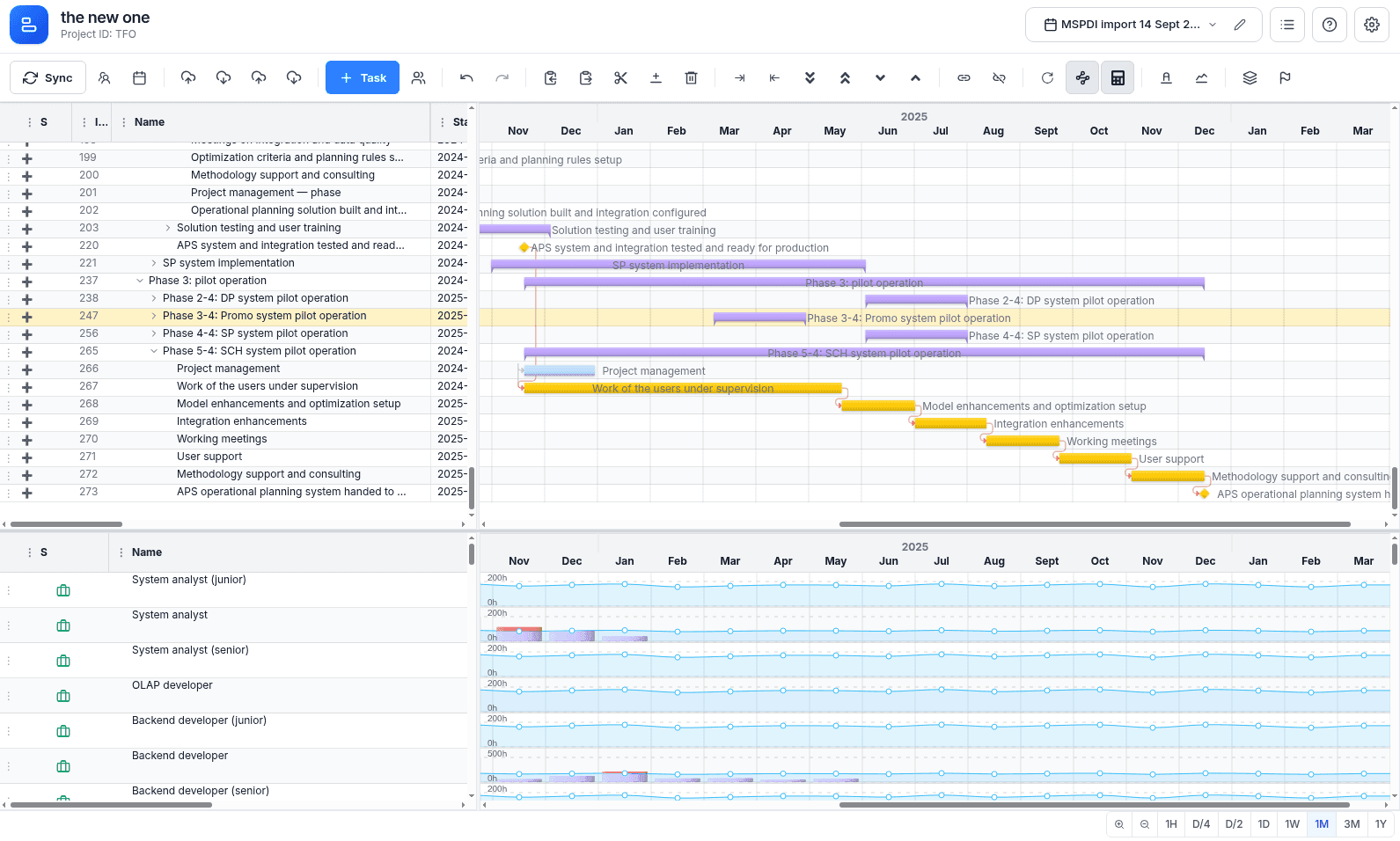
MSP Planner's scheduling engine implements the professional Critical Path Method (CPM), calculating the network of dependencies in real-time.
1. Activating the Critical Path
To visualize the critical chain, enable the Critical Path toggle in the toolbar.
- Visual Cue: Tasks on the critical path are highlighted (typically in red).
- Real-time Updates: As you move tasks or change dependencies, the engine instantly recalculates the path, showing you the immediate impact on your project finish date.
2. Identifying the Critical Chain
The engine isolates the critical chain—the sequence of tasks where any delay directly pushes the project end date. In an enterprise setting, these are the "strategic bottlenecks" that require the most senior oversight and the most stable resource commitments.
3. Managing "Float" (The Strategic Buffer)
Tasks not on the critical path possess Float (or Slack). This is not "extra time," but rather a strategic buffer.
- Zero Float: The task is critical. There is no room for error.
- Positive Float: You have a management window. You can shift these tasks to accommodate emergencies or reallocate resources to the critical path without impacting the project deadline.
Operationalizing the Critical Path
The power of CPM lies in its use as a dynamic tool for decision-making, not just a static report.
Performing "What-If" Analysis
Because the engine is deterministic, you can use the Gantt chart as a sandbox to test scenarios:
- Resource Shifting: Change a task's Scheduling Mode from Fixed Duration to Fixed Work and add resources to see if you can pull in the finish date.
- Dependency Optimization: Try changing a "Finish-to-Start" link to a "Start-to-Start" link to see if overlapping phases can accelerate the project.
- Impact Assessment: Move a non-critical task to see how much float you can consume before it becomes critical.
Detecting "Critical Path Drift"
By using the Baseline Overlay, you can compare your current critical path against the approved project baseline:
- The Risk: If the critical path has shifted to a different set of tasks than what was baselined, you have Path Drift. This indicates that a new, unexpected bottleneck has emerged, which is often a more serious risk than a simple date slip on the original path.
- The Action: When drift is detected, re-evaluate the resource allocation for the new critical chain immediately.
Practitioner's Perspective: Strategic Application
As a seasoned Project Manager, you don't just "look" at the critical path—you use it to drive governance.
🚩 Focused Risk Mitigation
Instead of a "whack-a-mole" approach to risk, focus your mitigation strategies exclusively on the critical path. Any risk associated with a non-critical task is a secondary concern until its float is exhausted.
⚖️ Dynamic Resource Balancing
The critical path allows for mathematically sound resource reallocation. If a critical task is slipping, you can identify non-critical tasks with high float and move their resources to the critical path. This is the only way to accelerate a project without increasing total headcount.
📉 Variance Analysis & Reporting
When reporting to a Steering Committee, the Critical Path provides the only "honest" metric for project health.
- Standard Report: "We are 80% done with tasks." (Misleading)
- Governance Report: "The Critical Path has slipped by 4 days due to the 'API Integration' bottleneck." (Actionable)
Advanced Governance: The "Criticality Transition"
A common failure in project management is the Criticality Trap. This occurs when a non-critical task is ignored until its float is consumed, at which point it suddenly becomes the new critical path—often without the PM noticing.
MSP Planner prevents this by visualizing the transition in real-time. When a task's float approaches zero, it becomes a "near-critical" task, alerting you to intervene before the project deadline is compromised.
Summary for PMOs
| Concept | Management Action | Business Outcome |
|---|---|---|
| Critical Task | Maximum Oversight & Stability | Guaranteed Delivery Date |
| Positive Float | Resource Flexibility | Optimized Utilization |
| CPM Engine | Real-time Scenario Testing | Predictive Governance |
Related guide: Critical Path in Jira — a deeper, tool-agnostic walkthrough of critical path and float in Jira.